hBasic Manual
Changes to
Dialogs| INPUT | Restrict INPUT to a single row |
| TEXT.INPUT |
Added Cancel
flag. |
| TGET and TGET.S/N/I/P |
Overhauled for
console Simple input for all screens |
| SELECT.MULTI SELECT.FILE SELECT.MULTIFILE SELECT.DIR |
Select one or more
items Select a file Select one or more files Select a directory |
| DIALOG.SET | Customise
appearence to some of the dialogs |
(see also DIALOG.SET)
INPUT
{prompt_sexp}, result_nvar
{,{default_exp}{,canceled_nvar}}{,extraFlags_nexp}
An optional extraFlags at the end of INPUT was added.
If this flag is 1, input is constrained to a single
line.
Default is 0 = off.
Default is 0 = off.
(see also DIALOG.SET)
TEXT.INPUT
result$_svar{,initial_text_sexp}
{,title_sexp} {,cancelled_nvar}
A cancelled_nvar flag was added to this command. It informs whether the user cancelled the input via the backKey.
A cancelled_nvar flag was added to this command. It informs whether the user cancelled the input via the backKey.
If the user cancelled the input, the contents of
<result$_svar>
remain unchanged.
cancelled_nvar
will be true
and
the result$_svar will contain initial_text_sexp (if used) or will be empty (if unused).
and
the result$_svar will contain initial_text_sexp (if used) or will be empty (if unused).
e.g
TEXT.INPUT store$, default$, Title$,
cancelled
IF cancelled THEN PRINT "Do you want to try again ?"
IF cancelled THEN PRINT "Do you want to try again ?"
(Since v4.90+ The orientation of TEXT.INPUT will lock
to the same orientation of the top most screen at the
time the command is called.)
TGET result$_svar { ,prompt_sexp } {,
title_sexp } {
,backKey_nvar }
Get text Input after the last line of the console.
where
To simulate a terminal, make sure the console is in front (otherwise it will just be a line overlaid on graphics or web).
Input and Output
result$
is the return string ( not
optional)
title
sets the window title (optional)
backKey is a variable to return the backKey flag (optional)
This variable will be overwritten.
This result will be added to the prompt and printed after the last line.
If the user entered nothing or was cancelled (BackKey) the result will be the empty string and only the prompt is printed.
prompt
sets the prompt (optional)This result will be added to the prompt and printed after the last line.
If the user entered nothing or was cancelled (BackKey) the result will be the empty string and only the prompt is printed.
This string will be printed on the left of the
input line e.g "cmd>"
backKey is a variable to return the backKey flag (optional)
0 => backKey was not pressed to exit TGET
1 => backKey was pressed to exit TGET
1 => backKey was pressed to exit TGET
Preceding commas are needed to seperate parameters if
they are used.
TGET now closely resembles the output
console.To simulate a terminal, make sure the console is in front (otherwise it will just be a line overlaid on graphics or web).
Input and Output
Before input from the user, TGET ignores any value in
result$.
After input from the user, TGET prints both the prompt and user input to the console.
This is not true for subcommands (see later).
The exception is if the user presses 'Stop' from the console menu, in which case 'Stopped by user' is printed instead, and the program execution is stopped or exited. You can also customise the menu via MENU commands.
After input from the user, TGET prints both the prompt and user input to the console.
This is not true for subcommands (see later).
The exception is if the user presses 'Stop' from the console menu, in which case 'Stopped by user' is printed instead, and the program execution is stopped or exited. You can also customise the menu via MENU commands.
TGET (main) colors will follow the console styling. Any
style changes to
the console will do the same to TGET.
This is different to subcommands styling (see later).
This is different to subcommands styling (see later).
Graphics and Web Screens
TGET (main)
now also works in graphics and web screens.
The input box will appear above the soft keyboard and will overlay the content.
For older devices, a hidden statusbar might cause the contents to scroll up during TGET input.
The input box will still follow console styling.
The input box will appear above the soft keyboard and will overlay the content.
The exception is immersive mode,
where it will appear at the top.
(It is not advisable to have the actionbar showing in immersive mode because it overlaps with TGET)
(It is not advisable to have the actionbar showing in immersive mode because it overlaps with TGET)
For older devices, a hidden statusbar might cause the contents to scroll up during TGET input.
The input box will still follow console styling.
Examples
TGET
r$,
"cmd >",
"Enter
Command"
TGET r$, "Input your password >", "Security Check", bkey
IF bkey THEN PRINT "Do you want to Quit ?"
(see sample program h05_shell.bas for a demo of a terminal emulator)
TGET r$, "Input your password >", "Security Check", bkey
IF bkey THEN PRINT "Do you want to Quit ?"
(see sample program h05_shell.bas for a demo of a terminal emulator)
TGET Sub commands
(see also DIALOG.SET)
These sub-commnds are designed to quickly get input
without
adding text to the console.
TGET.S result$_svar { ,prompt_sexp } {, title_sexp } { ,backKey_nvar }
TGET.N result$_svar { ,prompt_sexp } {, title_sexp } { ,backKey_nvar }
TGET.I result$_svar { ,prompt_sexp } {, title_sexp } { ,backKey_nvar }
TGET.P result$_svar { ,prompt_sexp } {, title_sexp } { ,backKey_nvar }
These are the differences between TGET and subcommands;
All subcommands do not print the prompt+result$ after they finish.
All subcommands will use the old value of result$ as the intial value.
All subcommands have the prompt above the input unless the prompt is empty or omitted.
TGET.S result$_svar { ,prompt_sexp } {, title_sexp } { ,backKey_nvar }
TGET.N result$_svar { ,prompt_sexp } {, title_sexp } { ,backKey_nvar }
TGET.I result$_svar { ,prompt_sexp } {, title_sexp } { ,backKey_nvar }
TGET.P result$_svar { ,prompt_sexp } {, title_sexp } { ,backKey_nvar }
These are the differences between TGET and subcommands;
All subcommands do not print the prompt+result$ after they finish.
All subcommands will use the old value of result$ as the intial value.
All subcommands have the prompt above the input unless the prompt is empty or omitted.
Both the prompt and input text will be centered.
Both the prompt and input text will follow the TITLE
colors of DIALOG.SET (see below).
All subcommands will have the input box overlaid
instead of after the bottom.
Note: Even though the
screen will not scroll during input, your next PRINT
will automatically scroll the screen to the
bottom.
Like TGET, they get input into result$ with optional prompt and title.
The title (if used) temporarily replaces the console title. To prevent this, omit the title.
The backKey variable (if used) returns 1 if user had tapped the back key, otherwise 0.
TGET.S Similar to TGET except that it will not print out any text.
TGET.N Brings up a NUMERIC keyboard - restricts input as a real number.
TGET.I Brings up a NUMERIC keyboard - restricts input as an integer.
TGET.P Same as TGET.S except that it hides the input like a password.
Both N and I subcommands will still accept a negative number.
Both N and I subcommands will still return a number as a string.
You can use VAL() to parse it for a number.
Both N and I subcommands have no
error checking on the default result$
i.e you can default the input with a string, but the
keyboard will only let you type a number.
Styling
TGET subcommand colors will follow TITLE_FG and
TITLE_BG from DIALOG.SET.
If TITLE_FG has not been set, the default is a bright grey.
If TITLE_BG has not been set, the default is black.
This is different to TGET main styling (see above).
If TITLE_FG has not been set, the default is a bright grey.
If TITLE_BG has not been set, the default is black.
This is different to TGET main styling (see above).
Graphics and Web Screens
TGET
subcommands also works in graphics and web
screens.
The input box will appear above the soft keyboard and will overlay the graphics screen.
For older devices, a hidden statusbar might cause the contents to scroll up during TGET input. The input box colors will follow DIALOG.SET (see above).
The input box will appear above the soft keyboard and will overlay the graphics screen.
The exception is immersive mode,
where it will appear at the top.
(It is not advisable to have the actionbar showing in immersive mode because it overlaps with TGET)
(It is not advisable to have the actionbar showing in immersive mode because it overlaps with TGET)
For older devices, a hidden statusbar might cause the contents to scroll up during TGET input. The input box colors will follow DIALOG.SET (see above).
(see also DIALOG.SET)
SELECT.MULTI
rc_nvar
, <
array$[]
| list_nexp > { ,title_sexp } { ,message_sexp }
where
(use commas
to separate omitted
arguments)
Select multiple values fom a list.where
rc_nvar
is a return code;
or list_nexp or alternatively, an input and output list
message_sexp is an optional message for a popup.
Example
0 = No selection or cancelled
(backKey). < array$[] | list_nexp
> is untouched.
> 0 = The number of items selected. < array$[] | list_nexp > contains results.
array$[]
is an input and output string
array.> 0 = The number of items selected. < array$[] | list_nexp > contains results.
or list_nexp or alternatively, an input and output list
As an input array or
list, it contains
the list of items to be
shown.
As an output array or list, it returns the picked rows by the user.
title_sexp
is an optional title. The default title is
"Select".
This will be overwriiten with picked items, so it
is a good idea to use a copy.
e.g pickArr$[]
= orginalArr$[]
SELECT.MULTI rc, pickArr$[]
or LIST.COPY oList, pList
SELECT.MULTI rc, pList
SELECT.MULTI rc, pickArr$[]
or LIST.COPY oList, pList
SELECT.MULTI rc, pList
As an output array or list, it returns the picked rows by the user.
If there is one selection or more, the array or
list is overwritten with the picked rows
and rc will contain the number of items.
Warning: If using an array, the array will be re-dimensioned to the number of items returned.
If the selection was cancelled, the list or array is untouched.
and rc will contain the number of items.
Warning: If using an array, the array will be re-dimensioned to the number of items returned.
If the selection was cancelled, the list or array is untouched.
message_sexp is an optional message for a popup.
It will be the same as title if title is set
otherwise it will not show.
You can turn this message off by setting this to ""
(empty).
Example
|
dialog.set "window_bg green" array.load f$[],"Orange","Banana","Apple","Pear" p$[] = f$[] % make a copy SELECT.MULTI rc,p$[],"Pick Fruits","" if rc=0 then ?"Nothing Picked" debug.on debug.dump.array p$[] debug.off END |
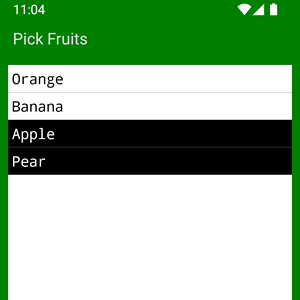 |
(see also DIALOG.SET)
SELECT.FILE
rc_nvar
, path_svar
{
,title_sexp }
where
{ ,dirLock_lexp } {
,editable_lexp } { ,endsWith_sexp }
Select a file from the file system.
(use
commas to
separate omitted arguments)
where
rc_nvar
is a return code;
As an output path, path_svar returns the path of the selected filename (directory + filename).
title_sexp
is an optional title. The default title is "Select
File".
dirLock_lexp is an optional flag to lock the directory so that the user cannot navigate away.
editable_lexp is an optional flag to make the text box editable.
Example
1 = OK. Filename selected (or
defaulted using path_svar).
path_svar is
updated.
0 = No selection (filename is empty). path_svar is updated.
-1 = Cancelled (backKey). path_svar is untouched
-2 = Directory Error (does not exist or no access). path_svar is untouched.
path_svar is
an input and output path.0 = No selection (filename is empty). path_svar is updated.
-1 = Cancelled (backKey). path_svar is untouched
-2 = Directory Error (does not exist or no access). path_svar is untouched.
As an input
path, path_svar may contain a
directory and/or a filename.
e.g
my_dir/
e.g my_dir/my_file.txt
e.g my_dir/my_file.txt
This sets the starting
point of the directory navigation.
A empty or blank path represents the <>/data/ directory. (Default).
A empty or blank path represents the <>/data/ directory. (Default).
Directories should end
with a slash
( / ). The exception is the
empty path ("") which
represents the relative path from <>/data/.
represents the relative path from <>/data/.
e.g
my_dir/
If a relative directory is given, it will set the starting point relative to <>/data/
You will see it as "Path: my_dir" on the first line of the list.
Filenames must always end without a
slash ( / )If a relative directory is given, it will set the starting point relative to <>/data/
You will see it as "Path: my_dir" on the first line of the list.
e.g
my_file.txt
If a filename is given, it will fill the textbox at the dialog start.
This may be used as a suggestion for an editable textbox or a default value for an un-editable box.
If a filename is given, it will fill the textbox at the dialog start.
This may be used as a suggestion for an editable textbox or a default value for an un-editable box.
A path without a
starting slash ( / ) is always relative to
<>/data/
(recommended).
A path beginning with a slash ( / ) is considered as an absolute path (not recommended).
A path beginning with a slash ( / ) is considered as an absolute path (not recommended).
For scoped storage, many absolute paths are
inaccessible and you might not see any files
other than those created by the app itself.
As an output path, path_svar returns the path of the selected filename (directory + filename).
If the input path started without a
slash ( / ) or was
empty,
(recommended)
the output path is always relative to
<>/data/
If the input path started with a slash ( /
),
(not recommended)
Tip: to split the <path>/filename, you can use IS_IN ("/",path$, -1) to find the last slash.
the output path is absolute.
Tip: to split the <path>/filename, you can use IS_IN ("/",path$, -1) to find the last slash.
dirLock_lexp is an optional flag to lock the directory so that the user cannot navigate away.
Default is false (no lock).
If a directory has no files and the textbox is un-editable, then it is not advisable to lock the directory.
If a directory has no files and the textbox is un-editable, then it is not advisable to lock the directory.
editable_lexp is an optional flag to make the text box editable.
If this flag is false (default), the user is not
able to alter the contents of the text box.
If this flag is true, the user may edit the textbox.
e.g This may be used to get a new file name from the user.
The dialog never creates any new files.
endsWith_sexp is a simple
end-filter (optional).
The textbox can only be filled by selecting a
file, or defaulted using path_svar.
If this flag is true, the user may edit the textbox.
The contents are appended to the directory path
and returned as path_svar when the
user clicks OK.
If the user types in a filename, or adds a subpath before the filename,
If the user types in a filename, or adds a subpath before the filename,
the dialog does not check it's
validity. It is up to the developer to do
this.
e.g This may be used to get a new file name from the user.
The dialog never creates any new files.
If this string is not empty, the dialog will list
only those files that end with the string in
endsWith.
e.g ".txt"
(note that an asterisk is not needed and shouldn't be used.)
e.g ".txt"
(note that an asterisk is not needed and shouldn't be used.)
Example
|
p$=""
% default is
relative to data/ if rc= 0 then ?"No Selection" if rc= -1 then ?"Cancelled" if rc= -2 then ?"Error> Bad Dir!" PRINT "Path: ";p$ i = IS_IN ("/",p$,-1) % i.e lastIndexOf / PRINT "Dir : ";left$(p$,i) PRINT "File: ";mid$(p$,i+1) END |
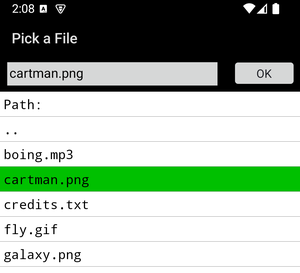 |
(see also DIALOG.SET)
SELECT.MULTIFILE
rc_nvar
, path_svar , <
array$[]
| list_nexp >
{ ,title_sexp } {
,dirLock_lexp } {
,endsWith_sexp }
(use commas
to separate omitted
arguments)
Select a set of files from the file system into an
array or list.
where
where
rc_nvar
is a return code;
path_svar
is an input and output
path;
A path without a starting slash ( / ) is always relative to <>/data/ (recommended).
A path beginning with a slash ( / ) is considered as an absolute path (not recommended).
As an output
path, path_svar returns the
path of the navigated directory.
array$[]
is an output string array
or list_nexp or alternatively, an output list.
As an output array or list, it returns the picked filenames.
If there is one selection or more, the array or list is overwritten with the picked rows
and rc will contain the number of items.
Warning: If using an array, the array will be re-dimensioned to the number of items returned.
title_sexp
is an optional title. The default title is "Select
File(s)".
dirLock_lexp is an optional flag to lock the directory so that the user cannot navigate away.
endsWith_sexp is a simple end-filter (optional).
> 0 = The number of files selected.
path_svar is
updated.
0 = No
selection.
path_svar is
updated.
-1 = Cancelled (backKey). path_svar is untouched
-1 = Cancelled (backKey). path_svar is untouched
-2 = Directory
Error.
path_svar is
untouched. (does not exist or no access)
For any rc > 0 <array$[]_sarray | list_nexp > contains results, otherwise it is untouched.
For any rc > 0 <array$[]_sarray | list_nexp > contains results, otherwise it is untouched.
As an input
path, path_svar may contain a
directory path.
This sets the starting
point of the directory navigation.
An empty or blank path represents the <>/data/ directory. (Default)
An empty or blank path represents the <>/data/ directory. (Default)
Directories should end
with a slash
( / ). The exception is the
empty path ("") which
represents the relative path from <>/data/.
represents the relative path from <>/data/.
e.g
my_dir/
If a relative directory is given, it will set the starting point relative to <>/data/
You will see it as "Path: my_dir" on the first line of the list.
If a relative directory is given, it will set the starting point relative to <>/data/
You will see it as "Path: my_dir" on the first line of the list.
Filenames (i.e without ending slash / )
are
always ignored. Only the directory is
taken.
e.g
my_dir/my_file.txt
is taken as
my_dir/
A path without a starting slash ( / ) is always relative to <>/data/ (recommended).
A path beginning with a slash ( / ) is considered as an absolute path (not recommended).
For scoped storage, many absolute paths are
inaccessible and you might not see any files
other than those created by the app itself.
The returned path is always a directory and
usually ends with a slash ( / ),
The exception is that it will be empty if
the directory is
<>/data/ on a relative path,
or if the dialog was cancelled or error.
If the input path started without a slash ( / )
or was empty,
(recommended)
the output path is always relative to
<>/data/
If the input path started with a slash ( / ),
the output path is absolute.
or list_nexp or alternatively, an output list.
As an output array or list, it returns the picked filenames.
If there is one selection or more, the array or list is overwritten with the picked rows
and rc will contain the number of items.
Warning: If using an array, the array will be re-dimensioned to the number of items returned.
dirLock_lexp is an optional flag to lock the directory so that the user cannot navigate away.
Default is false (no lock).
If a directory has no subdirectories and no files, it is not advisable to lock the directory.
If a directory has no subdirectories and no files, it is not advisable to lock the directory.
endsWith_sexp is a simple end-filter (optional).
If this string is not empty, the dialog will list
only those files that end with the string in
endsWith.
e.g ".txt"
(note that an asterisk is not needed and should not be used.)
e.g ".txt"
(note that an asterisk is not needed and should not be used.)
Example
|
dialog.set "window_bg darkblue" p$="" % default is relative to data/ list.create S,source list.copy source,picked SELECT.MULTIFILE rc, p$, picked if rc= 0 then ?"No Selection!" if rc= -1 then ?"Cancelled" if rc= -2 then ?"Error> Bad Dir!" PRINT "Path: ";p$ debug.on debug.dump.list picked debug.off END |
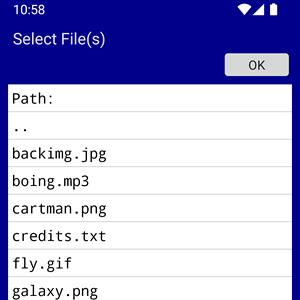 |
(see also DIALOG.SET)
SELECT.DIR
rc_nvar
, path_svar { ,title_sexp } {
,dirLock_lexp } {
,editable_lexp }
where
Examples
( use commas
to separate omitted
arguments)
Select a directory from the file system.where
rc_nvar
is a return
code;
dirLock_lexp is an optional flag to lock the directory so that the user cannot navigate away.
editable_lexp is an optional flag to show an editable text box.
1 =
OK.
path_svar is
updated.
-1 = Cancelled (backKey). path_svar is untouched.
-2 = Directory Error. path_svar is untouched. (does not exist or no access)
(note that there is no return code of zero).
path_svar
is an
input and output path;-1 = Cancelled (backKey). path_svar is untouched.
-2 = Directory Error. path_svar is untouched. (does not exist or no access)
(note that there is no return code of zero).
As an input
path, path_svar may contain a
directory path.
As an output
path, path_svar returns the
path of the navigated directory.
If the user typed a name into the textbox and presses OK, it will be converted into a directory name,
i.e the dialog will append it to the path (see editable_lexp).
If the final path has no end slash, one will be appended.
title_sexp
is an optional title. The default title is "Select
Directory".
This sets the starting
point of the directory navigation.
Directories should end with a slash ( / ). The exception is the empty path ("") which
represents the relative path from <>/data/.
Directories should end with a slash ( / ). The exception is the empty path ("") which
represents the relative path from <>/data/.
A path without a
starting slash ( / ) is always relative to
<>/data/
(recommended).
A path beginning with a slash ( / ) is considered as an absolute path (not recomended).
A path beginning with a slash ( / ) is considered as an absolute path (not recomended).
For scoped storage, many absolute paths are
inaccessible and you might not see any
files.
e.g
my_dir/
is relative to <>/data/
(empty) is <>/data/
(empty) is <>/data/
Names (without an end slash / )
are
always ignored. Only the directory is
taken.
e.g
my_dir/my_file
is the same
as
my_dir/
my_file is the same as (empty)
my_file is the same as (empty)
If a directory is given,
you will see it as "Path: my_dir"
on the first line of the directory list.
The returned path is always a directory and
usually ends with a slash ( / ),
The exception is that it will be empty if the
directory is <>/data/
on a relative path,
or if the dialog was cancelled or error.
If the user typed a name into the textbox and presses OK, it will be converted into a directory name,
i.e the dialog will append it to the path (see editable_lexp).
If the final path has no end slash, one will be appended.
If the input path started without a slash ( / )
or was empty,
(recommended)
the output path is always relative to
<>/data/
If the input path started with a slash ( /
),
(not recommended)
the output path is absolute.
dirLock_lexp is an optional flag to lock the directory so that the user cannot navigate away.
Default is false (no lock).
If a directory has no subdirectories and the textbox is un-editable, it is not advisable to lock the directory.
If a directory has no subdirectories and the textbox is un-editable, it is not advisable to lock the directory.
editable_lexp is an optional flag to show an editable text box.
If this flag is false (default), there is no
text box.
If this flag is true, the user may edit a textbox to enter a directory name.
e.g This may be used to get a new directory
name from the user.
The dialog never creates any new directories.
If this flag is true, the user may edit a textbox to enter a directory name.
The contents are appended to the directory path
and returned as path_svar when the
user clicks OK.
If the user types in a directory name or adds a subpath to the name,
If the user types in a directory name or adds a subpath to the name,
the dialog does not check it's
validity. It is up to the developer to do
this.
Upon click OK, if the user did not add a slash (
/ ) to the name, a slash will be appended.
The dialog never creates any new directories.
Examples
|
p$="../source/" SELECT.DIR rc,p$,"Pick a Directory" if rc= -1 then ?"Cancelled" if rc= -2 then ?"Error> Bad Dir!" PRINT "Path: ";p$ END |
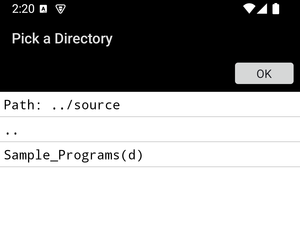 |
|
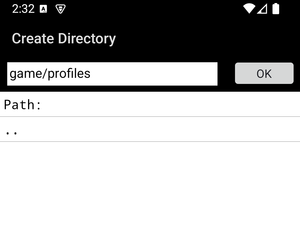
REM Editable entry p$="" SELECT.DIR rc,p$,"Create Directory",,1 if rc= -1 then ?"Cancelled" if rc= -2 then ?"Error> Bad Dir!" PRINT "Path: ";p$ FILE.MKDIR ok,p$ % create dir if ok then ? p$;" Success" else ?"Could not create ";p$ endif END |
 |
|
DIALOG.SET < pair_sexp
>
{ , .. }
|
DIM WINDOW_BG VOIDCOLOR HIGHCOLOR TITLE_FG TITLE_BG TITLE_FONT TITLE_ALIGN TITLE_PAD TEXT_FG TEXT_BG STATUSTXT NAVBARTXT |
Certain attributes to the appearence of dialogs (and screens that behave like dialogs) can be changed with this command.
e.g
DIALOG.SET
"DIM
0"
% sets the background
dimming level for pop-up dialogs
Do note that;
These settings are sticky and
shared.
i.e they will affect all future calls to dialogs that use them. Some can be reset with "default".
i.e they will affect all future calls to dialogs that use them. Some can be reset with "default".
where <pair_sexp> = "<keyword>[ |= ]<value> {,..} "
note : pair is a
string
expression.
(the '='
is optional but there must be a space if it is
not used)
This format is similar to CONSOLE.SET.
You can use commas to separate pairs either inside a
string or outside the strings.
You can use the continuation marker (~) to continue a line after a comma,
For some values, you may use the reserved value
"default".You can use the continuation marker (~) to continue a line after a comma,
or you can concatenate strings after the marker
with "+".
The Keyword Value Pairs accepted are below.
For DIALOG.SELECT,
DIALOG.MESSAGE
&
INPUT only,
DIM the background
of the dialog to a percentage.
(0..100)
0
will turn off the dimming.
100 will be solid black.
default will use Android's default (usually 60%)
Fractional part of numbers is allowed e.g 25.5
100 will be solid black.
default will use Android's default (usually 60%)
Fractional part of numbers is allowed e.g 25.5
For SELECT ,
SELECT.<SubCommands>
, TEXT.INPUT, &
TGET.<SubCommands>
,
Set the title
foreground color.
For TGET, this will also be the input text color.
color
A color string
default will be transparent, revealing the window_bg.
default will be transparent, revealing the window_bg.
For TGET subcommands, the
default will be black instead.
For TGET, this will also be the input background
color.
For SELECT ,
SELECT.<SubCommands>
, TEXT.INPUT
(screens that behave like dialogs)
Set the window
background color. (see decors)
This may affect the dialog background and system bars background colors.
This may affect the dialog background and system bars background colors.
"VOIDCOLOR
<color>|default"
e.g DIALOG.SET
"VOIDCOLOR
green"
Set the
background color for empty items.
For all SELECT type dialogs only.
This is the color below the last line of a list that fills the void of empty items.
For all SELECT type dialogs only.
This is the color below the last line of a list that fills the void of empty items.
color
A
color string
default (if not set) will be to follow the text background color TEXT_BG.
If you set this color to transparent (#00000000) then the window background
window_bg will be revealed.
default (if not set) will be to follow the text background color TEXT_BG.
If you set this color to transparent (#00000000) then the window background
window_bg will be revealed.
Set the highlight
color behind tapped text for
single-selection.
This is the highlight color of a single selection.
color A color string
default is #0xFF00C000
This is the highlight color of a single selection.
color A color string
default is #0xFF00C000
e.g
DIALOG.SET
"TITLE_FONT
= sans-serif-medium"
% use family
font
Set the font for
the title.
The format of the name is the same as
CONSOLE.SET "font = name{.style}
It can either be a font index number (loaded font) or the name of a family font.
For a font index,
If unused or set to "default", it will use the system default (usually sans-serif).
It can either be a font index number (loaded font) or the name of a family font.
For a font index,
the font must be loaded with the FONT command.
(example).
If the font index does not exist, there will be an error.
For a font
family,If the font index does not exist, there will be an error.
If a font family is not found, it will fallback to
the system default (usually sans-serif).
If unused or set to "default", it will use the system default (usually sans-serif).
e.g
DIALOG.SET
"TITLE_ALIGN
= RIGHT"
Set the alignment
for the title.
If any other value other than CENTER or RIGHT, then the alignment will default to the left.
If any other value other than CENTER or RIGHT, then the alignment will default to the left.
Set the left and
right padding for the title.
Horizontal padding will indent the title (if left or right aligned).
It will also use the title background color for padding.
+ve size means dp (device independent pixels)
-ve size means sp (scaled pixels, adhering to android user prefs)
0 size is also allowed.
The default value is 6 dp (to look similar to android system titles).
Horizontal padding will indent the title (if left or right aligned).
It will also use the title background color for padding.
+ve size means dp (device independent pixels)
-ve size means sp (scaled pixels, adhering to android user prefs)
0 size is also allowed.
The default value is 6 dp (to look similar to android system titles).
Set the main text
foreground color.
Set the status bar
text shading
Set the navigation
bar icon shading
Example
|
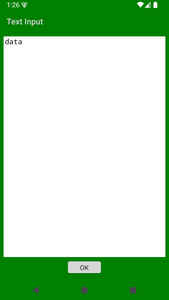
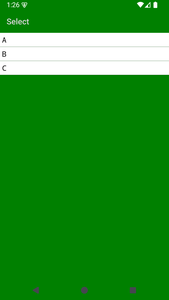
DIALOG.SET "Window_BG green",~ "VoidColor = green",~ "Title_FG lightgrey" TEXT.INPUT t$,"data",,cancelled if !cancelled then ?t$ array.load arr$[],"A","B","C" SELECT s,arr$[],,"" if s<>0 then ?"Selected row ";int$(s) END |
  |